
Home Bar Inventory App
Know every bottle in your home bar.
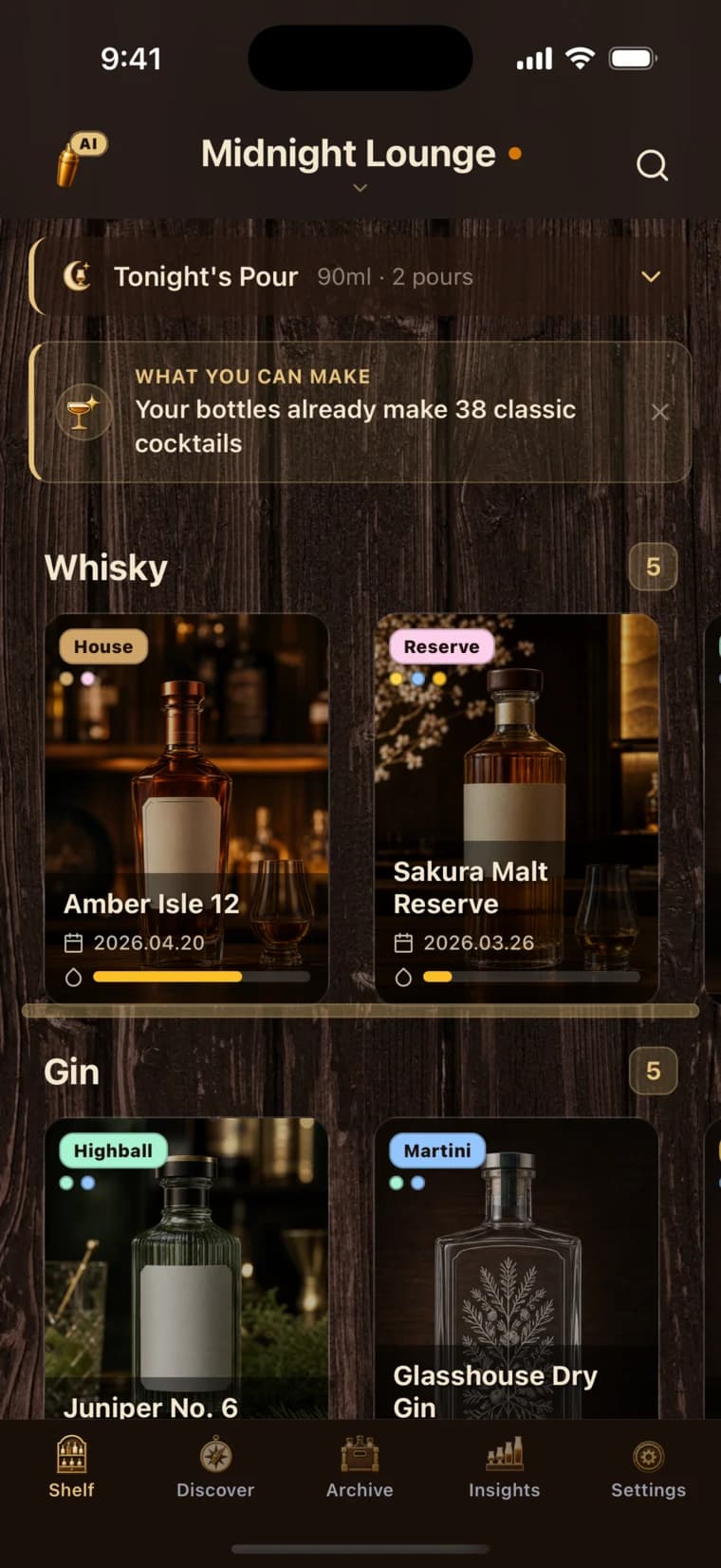
BarShelf gives your collection a clear, useful home on your phone. Catalog the bottles you own, keep the details that matter, manually adjust fill levels after a noticeable decrease, and move finished bottles into an archive instead of losing their history.
Kohyun Lim, BarShelf creator ·
Download BarShelf
iOS + Android
Built for supported phones
10 bottles
Included on the Free plan
Unlimited
Bottle storage with Pro
Use the same minimum record for every bottle
Record the name, category, ABV, and volume for every bottle. That minimum makes the inventory easier to scan and compare. Add optional purchase details, an opened date, labels or tags, a rating or review, and tasting notes when those details help you use the bottle.
Update the inventory at three moments
Add a bottle when it enters your bar. Adjust its fill level manually after a noticeable change rather than after every pour. Move it to the archive when it is finished or no longer part of your active stock. These three updates keep the shelf current without making inventory a daily chore.
Check the shelf before you buy
Before buying another bottle, check what is nearly empty, which bottles duplicate the same category, and which open bottles are rarely used. This quick review shows whether a purchase fills a gap in the bar or repeats something that is already available.
Separate active stock from history
Archive finished or retired bottles so the active shelf contains only what is currently available. The archived record keeps the bottle details, rating, and notes for later reference. Use the active shelf for shopping and pouring decisions, and the archive when you want to review bottles from the past.
Build a useful home bar inventory
- 1Add a bottle with AI-assisted label scanning or enter it manually.
- 2Review the bottle details and save your own tasting notes.
- 3Manually adjust the fill level after a noticeable decrease so the shelf stays current.
- 4Archive a finished bottle while keeping its history available.
Home bar inventory app FAQ
What can I record for each bottle?
Start with the name, category, ABV, and volume. Optionally add a photo, purchase details, opened date, labels or tags, rating or review, and notes when they are useful for that bottle.
Does BarShelf track the amount left automatically?
Fill levels are updated manually. Adjust the level after a noticeable decrease so nearly empty bottles remain easy to identify.
What happens when I finish a bottle?
Move the finished bottle to the archive. It leaves the active shelf while its details, rating, and notes remain available for reference.
Is the bottle label scanner always accurate?
The scan creates a draft bottle record. Review the suggested details, correct anything that needs attention, and then save it to your shelf.
How many bottles can I keep in BarShelf?
The Free plan supports up to 10 bottles. BarShelf Pro removes that bottle limit for people who need room for a larger or growing home bar. The app is available for supported iOS and Android phones.